Top 10 Best Budget Tech Gadgets in 2026: Value Picks for Everyday Use
My favorite “cheap but great” tech lesson from 2026 is this: you don’t need to buy new every time. A few well-chosen budget gadgets can fix real daily pain—weak Wi‑Fi, dead phone batteries, messy passwords, and boring charging habits.
Top 10 best budget tech gadgets in 2026 below are all practical picks for everyday use. I’m focusing on value you can feel fast: better signal, simpler backups, safer logins, and gear that won’t die after a month.
What counts as a “budget” gadget in 2026?
Budget in 2026 usually means you spend less than what most people think they should. A lot of these picks land between $15 and $60, with a couple “slightly higher but still worth it” options.
Here’s what I check before I call something a true value pick:
- Real-world payoff: Does it solve a daily problem (charging, Wi‑Fi, privacy), not just look cool?
- Common failure points: cheap chargers overheat, low-quality mics hiss, sketchy apps spam you with ads. I avoid those.
- Compatibility: USB‑C vs Lightning vs older devices matters. I include clear notes so you don’t end up with the wrong cable.
- Security basics: If it connects to your Wi‑Fi, it must support updates and use solid default security.
If you like tech that actually protects you, you might also enjoy our post on how to spot phishing scams. Most budget gadget failures aren’t technical—they’re human mistakes.
Top 10 best budget tech gadgets in 2026 (quick list)
These are the top 10 best budget tech gadgets in 2026 that give the most “everyday” value. I’m keeping them focused on what people use weekly, not just what tech fans test once.
- Budget USB‑C charger (30–45W) + 1-meter cable
- Portable power bank (10,000mAh class)
- Wi‑Fi extender or mesh add-on for weak rooms
- Smart plug with local scheduling
- Budget smart door/window sensor
- 1080p indoor security camera
- Microphone for calls (USB or phone mic kit)
- Noise-canceling earbuds (budget tier)
- Bluetooth tracker for keys/bags
- Password manager + security key starter setup
Not every home needs all ten. After you read the “who it’s for” notes, pick the 2–4 that match your biggest daily annoyance.
1) Budget USB‑C charger (30–45W) + the right cable
A good budget USB‑C charger is the cheapest upgrade you can buy because it fixes slow charging for phones, tablets, and a lot of laptops.
In 2026, most people have at least two devices that want USB‑C power. If you only buy one charger and one cable, choose a model that supports USB Power Delivery (USB‑PD)—that’s the standard that lets devices negotiate the right wattage.
What I look for: 30W minimum, 45W if you use a tablet or a small laptop. Look for a cable rated for 60W (some brands label it 5A). A “charge-only” cable is a common trap for people who think all USB‑C cables work the same.
Example budget setups that work
- Phone + small tablet: 30W charger + 1m cable (fast charge).
- Phone + older laptop: 45W charger + compatible cable (check your laptop power port).
- Travel: foldable plug + a cable you don’t mind keeping in a bag.
Common mistake: buying a cheap charger with “max 65W” on the box but no USB‑PD. It may charge, but slower than expected or it can throttle during longer sessions.
2) Portable power bank (10,000mAh class) for real days
A power bank is only “budget” if it survives real life. In 2026, you want good output, safe charging, and enough capacity for your week.
Most phones need about 1.5 full charges per day of heavy use. A 10,000mAh power bank usually gives you roughly 2 charges for smaller batteries and around 1 charge for bigger ones—real results depend on battery size and charging speed.
What to buy: USB‑C output with at least 20W for fast charging. If you carry a tablet too, look for two ports or USB‑C plus USB‑A.
My go-to rule for capacity
If your day is 6+ hours away from an outlet, I recommend at least 10,000mAh. If you travel or you’re out for work meetings all day, go 20,000mAh instead. It costs more, but you stop thinking about charging every hour.
3) Wi‑Fi extender vs mesh add-on: pick based on your layout

Weak Wi‑Fi is usually a signal problem, not a “your internet is bad” problem. The right budget tech for this depends on your home shape.
Wi‑Fi extender repeats an existing signal. Mesh add-on uses multiple nodes that talk to each other better and often switch devices more smoothly as you move rooms.
My quick decision guide:
- If you need help in one room and it’s fairly close: a Wi‑Fi extender can be enough.
- If you have two or three floors or thick walls: a mesh add-on usually behaves better.
- If you game or do lots of calls: avoid the cheapest extender models. They can add lag.
Placement beats price (and this is where most people get it wrong)
Many people plug an extender near the router. That gives it a weak “upstream” signal and a weak “downstream” signal. I move it halfway first, then test from the problem area.
Step-by-step: move it about halfway, check signal strength on your phone, then fine-tune. You’re aiming for a stable 2–3 bars in the room where you actually use your devices.
Also, if your router has old security settings, a stronger signal won’t save you. For safety, keep your router firmware updated and use strong Wi‑Fi password practices. If you want a checklist, see our router security basics.
4) Smart plug with local schedules (cheap home “automation”)
A smart plug is a budget gadget that makes your home feel smarter fast—without buying a whole smart home system.
In plain terms, a smart plug turns a device on or off through an app. The value part is scheduling: turn lights on when you’re not home, stop a fan at bedtime, or run a coffee maker at a set time.
What to prioritize in 2026: look for local scheduling or a strong offline behavior. “Local” means it can keep running your schedule even if the internet connection hiccups.
Real use cases I recommend
- Busy mornings: schedule a desk lamp 10 minutes before you start work.
- Plant care: run a grow light for 6–8 hours daily with a timer.
- Holiday mode: randomize lights for a lived-in look.
Common mistake: relying on a smart plug that only works through cloud servers. If the service is down, your schedule stops. Local scheduling is the safer bet.
5) Budget door/window sensor for basic home alerts
A door/window sensor is one of the best low-cost ways to add awareness to your home.
These sensors send a signal when something opens. Most people start with front door or a ground-floor window, then expand once they see the benefit.
Who it’s for: apartment renters, parents who want alerts when a back door opens, and anyone who has packages left out.
What matters more than the brand
- Battery life: pick one that advertises at least 1 year. In my experience, anything less gets annoying.
- Hub requirement: some sensors need a hub; others work directly with a compatible smart system.
- Notifications: fast push alerts are better than waiting for an email.
6) 1080p indoor security camera that’s actually affordable
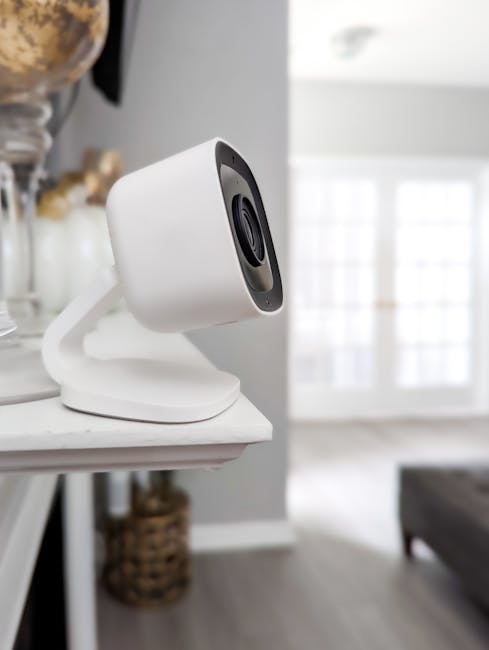
An indoor camera can be a budget win if it gives useful alerts without turning your life into constant notifications.
For most homes, 1080p is the sweet spot. Higher resolution costs more and usually doesn’t help as much as better placement and clear motion zones.
What I check before buying: two-way audio (so you can talk to someone), privacy shutter (for peace of mind), and motion detection that lets you set zones. A camera that watches everything constantly will drain your patience.
Where to place it for everyday meaning
- Entry way: aim at the path people take inside.
- Package spot: cover the area where deliveries are likely.
- Hallway: helps with “someone came in” alerts even if no one stands still.
Limitations: indoor cameras are not for “security theater” outdoors. If you need outdoor coverage, don’t buy an indoor-only model and hope it survives rain.
7) A budget microphone for better calls and recordings
If your calls sound bad, a $20–$50 mic can fix it faster than any laptop upgrade.
In 2026, video calls are constant for work, school, and even family chats. A mic helps especially if you sit at a noisy desk or you’re in an apartment with echo.
Two good paths: a clip-on USB mic for desktops, or a small phone mic kit for travel. Choose what matches your device. USB mics are plug-and-play for many computers.
Quick setup that stops the most common issues
- Plug it in and confirm the input device in your call app settings.
- Do a 10-second test recording in the room you use most.
- Move the mic slightly closer. People often test at “comfortable distance” and wonder why it sounds far away.
- If it picks up loud keyboard taps, change your angle. Point the mic a bit away from hard surfaces.
This is also a “security and privacy” win: clearer audio makes it easier to understand what someone is asking, so you’re less likely to respond to confusing scams.
8) Budget noise-canceling earbuds for focus
Noise-canceling earbuds are a budget upgrade because they cut stress. You hear what you want, and your brain rests.
Budget models in 2026 can handle everyday noise like buses, office chatter, and kitchen clatter. Just don’t expect “subway magic” for the cheapest sets.
What to look for: stable Bluetooth connection, a good transparency mode (so you can hear announcements), and controls you can use without pulling your phone out.
My practical buying checklist
- Battery: aim for 5+ hours per charge plus a case.
- Fit: different tip sizes matter more than people think.
- Mic quality: check reviews that mention calls, not just music.
9) Bluetooth trackers to find keys, bags, and chargers
A Bluetooth tracker is simple but useful: it helps you stop losing your stuff every day.
These devices pair with an app and show location when you’re nearby. Many also work with a “find network,” meaning other phones can help locate the tag when it’s out of Bluetooth range.
Where I’ve seen them help: parents who lose keys in a car, students with backpacks in crowded spaces, and anyone who always misplaces a power adapter.
What most people get wrong
They attach the tracker to something that’s always in motion. That sounds helpful, but it also means it’s always “moving,” so you get location pings constantly. Pick one “at-home” anchor item first: keys, a bag you carry daily, or a laptop sleeve.
10) Password manager + a security key starter setup
The best budget security gadget isn’t a device you plug in—it’s the software and hardware combo that stops account takeovers.
A password manager is software that stores your passwords in an encrypted vault. A security key is a small USB/NFC device that helps you log in without relying only on passwords.
My 2026 recommendation: use a trusted password manager (for easy, strong passwords) and add at least one security key for key accounts like email and banking.
Fast setup steps you can do today
- Pick a password manager and import any existing passwords from your browser.
- Turn on multi-factor authentication (MFA) for email first.
- Add a security key to your email account.
- Create a saved “backup plan” note: where your account recovery info is stored.
If you want more hands-on security tips, our site has a password manager best practices guide that matches what people actually run into (forgotten master password, account recovery, and unsafe browser extensions).
People Also Ask: Budget tech gadget questions (answered)
What are the best budget tech gadgets under $50 in 2026?
Under $50, the best picks are usually the boring winners: a 30W USB‑C charger, a small power bank, a smart plug, a Bluetooth tracker, and a basic security camera if you find a good deal. If you’re choosing only one, I’d pick the charger—because you’ll use it every day and it also improves charging speed.
Are budget Wi‑Fi extenders worth it?
Yes, but only when placement is right and your expectations match reality. If you’re trying to cover a huge area or you want low gaming latency, a cheap extender can disappoint. In those cases, a mesh add-on often gives smoother performance.
Which budget gadgets are safest to buy for privacy?
The safest are the ones that don’t constantly send data to random servers. For privacy, prioritize devices with clear update policies, local scheduling, and good app permissions. Also, keep your phone’s permissions tight and review device settings every few months.
Do smart plugs and cameras slow down your internet?
They don’t usually slow your internet in a big way, but they can increase traffic if you stream lots of video or if motion detection is set too broad. Set motion zones, reduce false alerts, and don’t put a camera in a spot where it triggers on shadows all day.
Comparison table: which gadgets give the best value?
This table is the “buying speed” view. Use it when you want to decide fast.
| Gadget | Typical budget | Best for | Main watch-out |
|---|---|---|---|
| USB‑C charger (30–45W) | $15–$45 | Fast daily charging | Missing USB‑PD support |
| 10,000mAh power bank | $20–$60 | Travel and busy days | No fast-charging output |
| Wi‑Fi extender / mesh add-on | $25–$150 | Dead zones | Poor placement |
| Smart plug | $15–$40 | Timers and routines | Cloud-only scheduling |
| Door/window sensor | $15–$45 | Simple alerts | Short battery life |
| Indoor 1080p camera | $30–$120 | Home awareness | Too many notifications |
| Budget microphone | $15–$60 | Better calls | Wrong input settings |
| Noise-canceling earbuds | $25–$120 | Focus in noise | Fit and mic quality |
| Bluetooth tracker | $15–$40 | Find keys/bags | Attaching to the wrong item |
| Password manager + security key | $30–$120 total | Account safety | No MFA on email |
My “2-hour budget upgrade plan” (do this in 2026)
If you want results fast, don’t buy ten things. I’d spend two hours and pick the biggest two problems to fix first.
Step 1 (20 minutes): list your daily annoyances. Weak Wi‑Fi in the bedroom? Slow charging? Missed calls because your mic sounds bad? Package worries?
Step 2 (40 minutes): choose two gadgets from the list that match the annoyances. Buy ones with clear specs: USB‑PD chargers, fast output power banks, and devices with good security defaults.
Step 3 (60 minutes): set them up carefully. Update firmware right away for anything that connects to Wi‑Fi. For cameras, set zones and test notifications once, then adjust.
Step 4 (optional 20 minutes): tighten your account security. Add MFA to your email, and set up a password manager if you’re still using reused passwords.
Where these picks don’t fit (important)
Budget tech isn’t for every situation. If you need medical-grade monitoring or professional home security, you’ll need a different class of equipment and service.
Also, if you rent and you can’t mount devices, prioritize cameras on stands or door sensors that stick with no drilling. Smart home gear is easiest when you match the limits of your space.
Conclusion: the best value is “fixing one annoying problem at a time”
The top 10 best budget tech gadgets in 2026 are all worth it when you buy them for a real need: faster charging, better Wi‑Fi, smarter routines, safer logins, and fewer everyday headaches.
If you only buy two, make them a quality USB‑C charger (30–45W) and one security upgrade—either a password manager with MFA or a basic camera/door sensor for awareness. That combo gives you daily comfort and real protection, which is the best kind of budget win.