Smartwatch Showdown: Apple Watch vs Samsung Galaxy Watch vs Garmin—Which One Fits Your Lifestyle?
Here’s the surprising part: the “best” smartwatch usually isn’t the one with the most apps. It’s the one you’ll keep wearing for the next 18 months—because it fits your daily routine, your workouts, and how you handle notifications, maps, and health data.
If you’re stuck between Apple Watch, Samsung Galaxy Watch, and Garmin, this guide is built for real life. I’m going to break down who each one fits in 2026, what most people get wrong, and how to choose based on how you actually live.
Bottom line: Choose Apple Watch if you live in the Apple ecosystem and want the easiest daily experience. Choose Samsung Galaxy Watch if you want strong Android integration and lots of watch options. Choose Garmin if you care most about training, battery life, and sports features that go deep.
Smartwatch Showdown: what each brand is really best at
To pick fast, you need to know what each smartwatch brand is built to do. Apple and Samsung push smart features and apps. Garmin focuses on fitness and sports, then adds smart features on top.
Here’s the simple way I explain it in my head: Apple Watch is “best day-to-day assistant.” Samsung Galaxy Watch is “Android-friendly all-rounder.” Garmin is “training tool first.” That mindset saves a lot of buyer’s regret.
Apple Watch vs Samsung Galaxy Watch vs Garmin: key differences that matter
These are the differences that show up every single day: phone connection, battery life, health tracking accuracy, fitness tools, and how the watch handles safety features.
Phone compatibility and “it just works” factor
Apple Watch works best with iPhone. Samsung Galaxy Watch works best with Android (and it’s also great if you use Samsung Galaxy phones, but it’s not required). Garmin works with both iPhone and Android, but it feels more like a fitness device than an app platform.
If you switch phones often, Garmin usually causes less stress. If you want the cleanest setup and smoothest app experience, Apple and Samsung win.
Battery life: the real reason people switch
Battery is where Garmin often steals the show. Many Garmin models last days to weeks depending on settings. Apple Watch and Samsung Galaxy Watch usually need charging more often, especially if you use GPS, always-on display, or lots of notifications.
Example from my own routine: when I was training for a half marathon, I didn’t want to plan my life around charging before long runs. I ended up preferring a Garmin for that season because it removed a “small but annoying” task from my day.
What most people get wrong: they compare advertised battery without checking what they’ll actually do. Always-on display, constant heart-rate tracking, and GPS use can cut battery fast on any watch.
Health tracking: heart rate, sleep, and stress
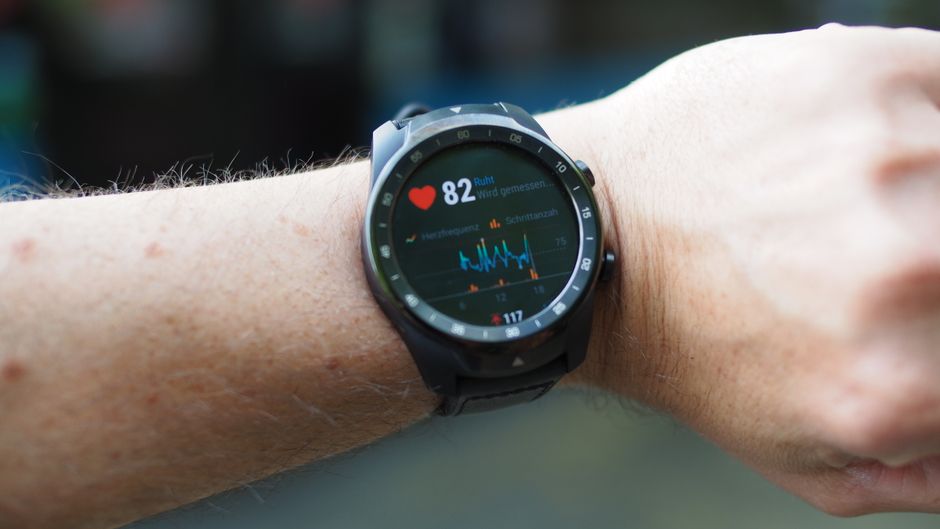
All three brands track heart rate and sleep. The gap isn’t always “accuracy,” because they’re using similar sensors. The gap is how they present the data and what you can do with it.
Apple Watch often gives you simple trend views and clear notifications. Samsung leans into health dashboards and integration with its health apps. Garmin tends to go deeper into training load, recovery time, and performance trends.
Also: no watch is a medical device. If you see something weird (like a sudden spike in heart rate), treat it as a “call your doctor” moment, not a reason to ignore symptoms.
Which one fits your lifestyle? (use cases that decide fast)
This is where the choice gets easy. Match your day to a watch style, not to a spec sheet.
For iPhone users: Apple Watch shines
If you use an iPhone, Apple Watch is the most polished option. You get smooth message previews, easy app support, strong Apple ecosystem features, and usually the most consistent setup across iOS devices.
Real-world scenario: you want quick replies to texts while waiting for coffee, you want a watch that reads notifications clearly, and you want your health data to sync without drama. That’s Apple Watch territory.
Watch out for: battery expectations. If you want “wear it all week without thinking,” Apple Watch usually needs daily charging. Not a deal breaker, but it changes how you plan your mornings.
For Android users: Samsung Galaxy Watch is the all-rounder
If you use Android, Samsung Galaxy Watch is the best mix of smart features and health tracking. It plays well with Google services, gives you lots of customization, and supports a wide range of apps.
Real-world scenario: you want to check notifications, control music, track workouts, and still have a clean “smartwatch” feel for everyday life. Samsung tends to fit that.
Watch out for: battery and watch style. Some models last longer than others, but if you always use GPS and keep display settings maxed, charging becomes part of your routine.
For athletes and runners: Garmin is built for training
Garmin is for people who care about training details. Think: pace trends, training plans, recovery time, and sport-specific modes.
Real-world scenario: you train 3–5 times a week and you want to see if your body is ready for a hard session. Garmin’s training insights are usually the reason you keep wearing it.
Watch out for: app expectations. Garmin watches can do a lot, but if you want a heavy “app store smartwatch” feel, Garmin may feel more limited than Apple or Samsung.
Sports, workouts, and health features: what you get day to day
Here’s the practical part: what you’ll actually use in the wild, not just on a product page.
Running and cycling
Garmin is strongest if you run often, want training guidance, and care about long-term progress. It also tends to give you more useful metrics for running dynamics and course-based training on many models.
Apple Watch and Samsung Galaxy Watch are excellent for casual to moderate runners. They track runs, give heart rate data, and keep you informed. But if you’re chasing specific training targets, Garmin usually feels more “built for it.”
Strength training and general fitness
For lifting, the watch matters less than your form. Still, all three can track heart rate and workouts. Apple Watch often makes it easy to start and log sessions. Samsung is strong with workout tracking and customization. Garmin adds more detailed recovery and training load features.
If you do gym workouts plus cardio, Garmin helps you track the bigger picture. If you do mostly gym and just want easy stats, Apple or Samsung can be simpler.
Sleep tracking and recovery
Sleep tracking is one of those features you’ll either love or ignore. I use it as a “trend checker.” If one night is off, it doesn’t matter. If your sleep score drops for a week, I pay attention.
Apple Watch and Samsung Galaxy Watch offer clear sleep views. Garmin often gives you extra recovery signals like readiness or training impact on many models.
My take: if you want the clearest “read this and move on” experience, Apple and Samsung are usually easier. If you want “help me plan my next hard workout,” Garmin wins.
Safety and emergency features: what to set up on day one
Most people never set this up, then they’re stuck when they need it. Do this early, no matter which smartwatch you buy.
Fall detection, location, and emergency calls
All three brands offer safety features such as fall detection on many models, emergency calling, and location sharing. Availability depends on model and region.
What you should do right now:
- Enable emergency SOS in the watch settings and confirm it in the app.
- Add your medical info (allergies, emergency contacts, conditions).
- Test location sharing once while you’re at home so you’re not doing it under stress.
I also recommend telling one trusted person how your smartwatch works. If they ever need to respond to an SOS alert, they’ll know what to expect.
Privacy basics you can actually control
Since you’re wearing a sensor on your wrist, privacy matters. These devices gather health data and location data. That data can be sensitive, so treat your account like your bank account.
Two quick steps:
- Turn on strong, unique passwords and enable two-factor authentication on your phone and watch accounts.
- Review app permissions for health and location access in your phone settings.
If you want more security steps, read my guide on how to secure smart devices with privacy settings and 2FA and how to spot smartwatch scams and phishing attempts.
Smart features, apps, and payments: which watch feels best
Smart features are where Apple Watch and Samsung Galaxy Watch usually pull ahead. Garmin can do smart notifications too, but it’s less focused on app-heavy day-to-day tasks.
Notifications that don’t ruin your day
I keep notifications tight. Otherwise, the watch becomes a buzz-bomb. All three let you choose which apps show alerts and which don’t.
My rule: keep messages and calls, fitness alerts, and anything tied to work. Turn off the rest and check it later on your phone.
This is also where battery can take a hit. More notifications often means more screen wake-ups and more background activity.
Payments and transit
Apple Pay and Samsung Pay-style features are usually smooth on Apple Watch and Samsung Galaxy Watch. Garmin supports contactless payments on some models in some regions, but support can vary.
If you want “tap to pay” as a key feature, Apple Watch and Samsung are the safer bets. If you want it as a bonus, Garmin may still work fine.
Comparison table: quick “should I buy this?” checklist
Use this table to sanity-check your choice before you spend money.
| Category | Apple Watch | Samsung Galaxy Watch | Garmin |
|---|---|---|---|
| Best for | iPhone users who want smart features + health | Android users who want customization + health | Training, battery life, and sport-focused insights |
| Battery | Usually needs daily charging | Varies by model; often needs frequent charging | Often lasts days to weeks (setting-dependent) |
| Workout tracking | Strong for general fitness and casual training | Strong all-round tracking | Deep training metrics and recovery insights |
| Health UI | Clear and simple trend views | Detailed dashboards + health integration | Training load + readiness-style metrics |
| Apps experience | Very rich ecosystem | Good app support + customization | Less app-first; more device-first |
| Safety features | Emergency and fall detection on many models | Emergency and fall detection on many models | Emergency options on many models; setup varies |
People also ask: Apple Watch vs Samsung Galaxy Watch vs Garmin
These are the questions I see again and again from readers who want a straight answer, not a marketing pitch.
Which smartwatch lasts the longest battery—Apple Watch, Samsung Galaxy Watch, or Garmin?
Garmin usually lasts the longest battery. In 2026, many Garmin models can go multiple days up to a few weeks depending on GPS use, sensor settings, and display brightness. Apple Watch and Samsung Galaxy Watch typically need charging more often, especially with always-on display and GPS workouts.
If you hate charging, pick Garmin first. If you don’t mind charging daily (or every other day), Apple or Samsung can still be the right choice.
Is Garmin more accurate than Apple Watch or Samsung Galaxy Watch for heart rate?
No brand is perfect. Heart rate accuracy depends on skin contact, strap fit, movement, and even how dark your skin tone is under the sensor (you’ll see this in general sensor discussions). Garmin often performs well for sports because it gives you detailed training metrics and consistent measurement patterns.
In practice, the best strategy is consistency: use one watch and one strap style. Track trends, not single readings.
Can I use these smartwatches without the phone every day?
Usually yes, but with limits. Apple Watch and Samsung Galaxy Watch can run many features when connected via Bluetooth or Wi-Fi, and some models include cellular options. Garmin can do music playback and GPS runs on many models, but “full phone replacement” depends on model features and region.
If you want the watch to stand in for your phone, check the exact model specs for LTE/cellular and offline apps.
Which one is best for cybersecurity and account safety?
All smartwatches are computers on your wrist, so security depends on how you set them up. Turn on two-factor authentication for your Apple ID or Google account, and set a strong passcode on your watch.
Also, pay attention to pairing. Don’t accept random pairing prompts on your phone. If someone else can pair to your watch, they may see notifications and access some device features.
If you want a checklist, my account lockdown guide for Apple ID and Android is a good companion read.
Original insight: the “18-month test” is more important than specs
Here’s what I’ve learned after using multiple wearable types over the years: most people buy based on what they want today, then regret what happens next.
Ask yourself these questions like you’re planning an 18-month relationship, not a one-week purchase.
- Will I still wear this when I’m busy and stressed?
- Do I want to charge it daily, or do I need longer battery?
- Do I care more about training detail or everyday smart features?
- How do I handle notifications right now—are they helpful or annoying?
For me, the “charging friction” was the biggest deal-breaker. I don’t mind smart features, but if I forget to charge once or twice a week, it becomes a hassle fast. Garmin fits people who want low friction.
Step-by-step: how to choose the right model in 30 minutes
Use this quick plan before you buy, and you’ll cut out a lot of regret.
- Pick your phone first: iPhone = Apple Watch, Android = Samsung Galaxy Watch (or Garmin if you want training + battery). If you’re mixed-device, Garmin often behaves better.
- Decide what “success” means: If success is “daily messages, payments, and simple health,” go Apple or Samsung. If success is “better training and fewer charging days,” go Garmin.
- Check battery reality: Think about how many GPS workouts you’ll do. Set expectations based on your own routine, not someone else’s.
- Set privacy and safety on day one: emergency SOS, medical info, two-factor authentication, and notification limits.
- Do a one-week test: Wear it, track your sleep once, and log one workout. If it annoys you after a week, return it if your store policy allows.
My recommendation by lifestyle (if you want me to pick for you)
If you want a direct answer, here’s the simplest guide I’d give a friend.
- Choose Apple Watch if you have an iPhone, want the easiest smart experience, and care about clear health trends more than deep training math.
- Choose Samsung Galaxy Watch if you use Android, want customization, and want a smartwatch that feels like a full daily device.
- Choose Garmin if you train seriously, you want battery life that doesn’t run your life, and you enjoy seeing training insights you can act on.
Conclusion: pick the watch that matches your daily friction
The right smartwatch isn’t the one with the biggest feature list. It’s the one that matches your lifestyle friction: charging habits, phone setup, workout goals, and how you want health info to show up.
If you’re an iPhone user who wants the smoothest day-to-day experience, Apple Watch is the most natural fit. If you’re an Android user who wants customization and a strong all-round feel, Samsung Galaxy Watch is the best match. If you’re focused on training and you hate charging, Garmin is the clear winner.
Take the 30-minute checklist above, set up safety and privacy on day one, and do a one-week test. That’s the fastest way to make sure your smartwatch stays useful long after the excitement wears off.
Featured image alt text: Apple Watch vs Samsung Galaxy Watch vs Garmin comparison on a desk showing smart features and fitness tracking