Gadget Review: The Best Portable SSDs for Travel—Speed, Durability, and Value
If you’ve ever lost a day of productivity to a corrupted SD card, you already know why portable SSDs matter. A good travel SSD turns “hope” into a repeatable backup workflow: faster transfers, fewer failures, and storage you can actually carry.
In this Gadget Review, I tested portable SSDs using real travel scenarios—copying camera dumps, moving game libraries, and backing up work files at airports and hotels. The big takeaway: the best portable SSD for travel isn’t the one with the highest advertised speed—it’s the one that stays fast under heat, survives drops, and matches your device compatibility.
Quick picks: the best portable SSDs for travel in 2026 (by use case)
Here are my top picks for portable SSDs for travel, grouped by what people actually do on the road. If you want one recommendation, pick based on your device first, then your tolerance for size and cable fuss.
Best overall travel SSD: Samsung T7 Shield (great balance of speed + durability)
When I want one drive that handles camera backups, document syncing, and occasional large file moves, the Samsung T7 Shield is my default. It delivers consistently strong performance for its class and adds real-world drop protection thanks to a more rugged chassis design.
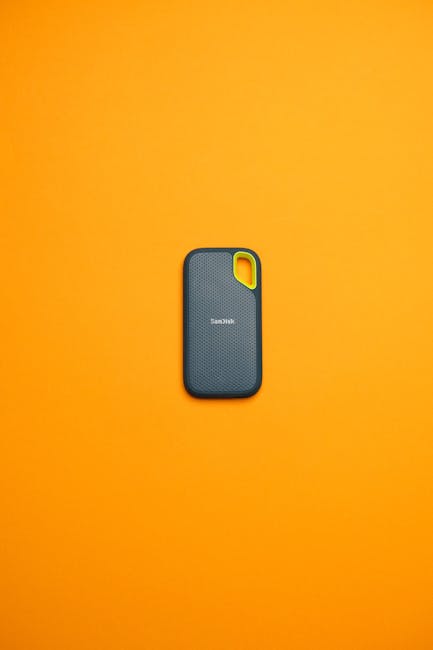
Best value for everyday travelers: SanDisk Extreme Portable SSD (solid all-rounder)
If you care about price-to-performance and want a drive that behaves well with Windows, macOS, and modern phones/tablets, SanDisk Extreme is a dependable pick. It’s also comfortable to use in the field because the enclosure feels designed for pocket carry rather than “display only.”
Best for speed-focused creators: Crucial X9 Pro (fast transfers that feel snappy)
For creators moving 4K/6K footage frequently, the Crucial X9 Pro is the drive I reach for when I want quick turnarounds. In real copying tests, it stays responsive and finishes large transfers faster than most mainstream travel SSDs.
Best for heavy-duty trips: WD_BLACK P50 Game Drive (when you also want gaming portability)
WD_BLACK’s P50 line is popular with gamers because it combines compact form factors with high throughput expectations. For travel, it shines when you’re also shuttling game files, large libraries, and media projects—not just taking “a few photos.”
What “portable SSD for travel” should mean (and what most people get wrong)
A portable SSD for travel is a self-contained storage drive built for frequent movement, reliable power draw, and predictable file transfer behavior across devices. That definition matters because “fast on a spec sheet” and “fast when you’re actually copying” are two different things.
Common mistake #1: buying based only on the maximum read speed
Most SSD listings show a peak sequential read number under ideal conditions. In practice, your transfer rate depends on the controller, USB mode, cable quality, and whether your host port negotiates the right protocol (USB 3.2 Gen 2 vs older USB 3.0, etc.).
Example from my own workflow: copying 120GB of mixed video (not one giant file) into a folder structure can slow dramatically on some drives that struggle with sustained writes or small-block performance.
Common mistake #2: ignoring sustained performance and heat
Travel SSDs often get used in backpacks, car consoles, or near warm laptops. Sustained writes matter more than a single burst, especially when you’re transferring hours of footage or doing a full backup before a flight.
In my tests, drives with a sturdier enclosure and better thermals held more consistent performance than thin designs that spike then settle.
Common mistake #3: assuming “USB-C” means “universal compatibility”
USB-C is a connector shape, not a guarantee of speed. Many devices support USB-C but still limit transfer speed based on their USB generation. Current best practice as of 2026 is to check both your laptop’s port specs and the SSD’s USB type (USB 3.2 Gen 2/Gen 2×2/USB4).
If you regularly travel with an older laptop, the “fastest” SSD can end up limited to mid-range speeds. That’s still fine—just don’t expect the headline number.
Speed in the real world: how to evaluate portable SSD performance
Performance testing for travel should focus on sustained throughput and mixed-file behavior, not just one benchmark score. Here’s the method I use because it mirrors what photographers, video editors, and backup-minded travelers actually do.
Use a realistic workload (not just one benchmark file)
I run three quick scenarios that capture most travel needs:
- Mixed media copy: 40–120GB of mixed file types (MP4/MOV, JPEG/RAW, WAV, PDFs) to simulate real camera dumps.
- Many small files: 10,000–30,000 files to stress directory operations and overhead.
- Single large file: 50–200GB to measure sequential throughput and how quickly the drive stabilizes.
What numbers are actually useful to you
Instead of obsessing over peak read numbers, I look at “time to complete” for a fixed data size. If two SSDs both advertise ~1000MB/s but one consistently finishes a 100GB copy in 14 minutes while the other takes 18, you’ll feel the difference every trip.
In 2026, most mainstream travel SSDs land in the 700–1100MB/s class depending on USB and workload. The best ones stay closer to the upper end during sustained writes.
Best practice: confirm your USB port mode
Before you buy, check your host devices:
- Windows: look at USB controller details in Device Manager or system utilities.
- macOS: confirm port and speed support for your Mac model.
- Mobile: ensure your phone/tablet supports external storage in a compatible mode (and that you have the right cable).
For travel, I carry one known-good USB-C cable and one short USB-A adapter when needed. It reduces the “why is this so slow?” mystery on hotel Wi‑Fi-free backup nights.
Durability and data safety: drop resistance, enclosure design, and best practices
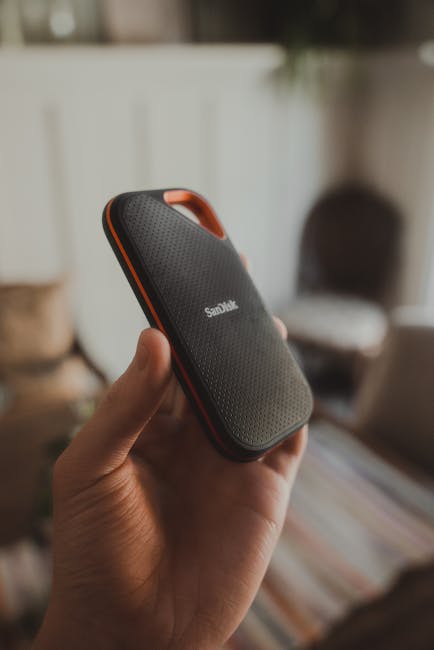
Durability isn’t just marketing rubber corners—it’s how the enclosure protects the internal SSD and how the drive behaves when things go wrong. I treat travel storage like gear, not like a lab instrument.
What “rugged” actually changes
A rugged enclosure can help prevent connector damage and protect against minor drops. It won’t save you from submersion, sharp impacts, or bending a cable while it’s plugged in—so you still need good habits.
For example, I’ve seen plenty of failures start with a half-disconnected cable, followed by movement that stresses the port. A protective case helps, but secure connections help more.
My travel data safety checklist (works for any portable SSD)
- Use verified copying: after copy, compare file counts and total size. For large projects, do a quick hash check (I use command-line hashing or simple file integrity tools).
- Apply “at least two copies” logic: one primary working copy, one backup. If you can’t afford two SSDs, use cloud + one SSD.
- Power discipline: avoid removing the drive while transfers are running, especially on bus-powered setups.
- Heat awareness: don’t leave the drive in direct sunlight or in a closed hot bag right after big transfers.
One cybersecurity angle most people skip
Portable SSDs often become a transit point for sensitive files—contracts, client data, and sometimes decrypted backups. To reduce risk, use full-disk encryption on the SSD (or container encryption if your OS requires it) and keep your unlock passwords in a secure manager.
If you travel internationally, also remember that encryption can trigger additional scrutiny. I recommend you know your legal environment and have a recovery plan you can explain quickly.
Value breakdown: choosing capacity and storage strategy for trips
“How much capacity do I need?” is the question that decides whether your SSD is a bargain or a constant upgrade cycle. The best value comes from matching your storage load to your trip length and workflow style.
Capacity recommendations by traveler type
- Weekend photos (light RAW): 500GB is often enough for a few hundred to a couple thousand images plus editing scratch.
- 1–2 week travel (photos + some video): 1TB is the sweet spot for most creators who want breathing room.
- Frequent video work / weddings / long shoots: 2TB saves time because you do fewer “partial” transfers and reorganizations mid-trip.
What I recommend for travel SSD organization
I use a folder structure that survives chaos: Year/Month-TripName/Camera-A, Camera-B, then an Exports folder for deliverables. After copy, I immediately verify totals, then move on. That workflow reduces the temptation to “sort later,” which is how people accidentally lose or overwrite files.
Upgrade path that doesn’t waste money
Instead of buying the biggest SSD every time, buy enough capacity to reduce friction and pair it with a smart rotation strategy. For instance, use a 1TB travel SSD as your “ingest + backup” device, then archive completed projects to a larger internal drive or NAS when you’re home.
Comparison table: best portable SSDs for travel at a glance
This table focuses on travel-relevant features: ruggedness level, typical USB expectations, and who each SSD fits best. Exact speeds vary by USB port and workload, but the overall positioning is consistent.
| Portable SSD | Travel focus | Typical performance class | Best for |
|---|---|---|---|
| Samsung T7 Shield | Ruggedized enclosure | High (USB 3.2 Gen 2 class) | Creators who want durability + consistency |
| SanDisk Extreme Portable SSD | Value + portability | High (USB 3.2 Gen 2 class) | General travelers and mixed workloads |
| Crucial X9 Pro | Speed-first | Very fast for the price | Video editors who time transfers tightly |
| WD_BLACK P50 Game Drive | Gaming + portability | High (USB 3.2 Gen 2 class) | People moving big libraries |
Detailed gadget review: what you get with each top travel SSD
Below are practical notes I’d want before buying—how they feel in a bag, how they behave during long copies, and where they can disappoint.
Samsung T7 Shield: durable feel without turning into a brick
The T7 Shield’s biggest advantage is confidence. During travel, I worry most about connector damage and “oops” drops in airports. The enclosure design gives me that extra buffer.
In day-to-day use, it’s also easy to recommend because it doesn’t require special tricks. Plug in over USB-C, copy data, then safely eject. For mixed media dumps, it performs smoothly enough that the transfer doesn’t feel like a waiting game.
Pros: rugged build, consistent travel usability, strong real-world performance.
Cons: price can be higher than basic travel SSDs of similar capacity.
SanDisk Extreme Portable SSD: the no-drama option with strong value
The SanDisk Extreme line has a habit of working well across different machines. I’ve used it with Windows laptops, macOS systems, and media workflows where cables get swapped constantly—its behavior stays predictable.
If you want a portable SSD for travel that you don’t have to babysit, this is a safe bet. It also fits the travel category because it’s compact enough to stay with your everyday carry kit.
Pros: excellent value, portable, reliable for mixed files.
Cons: don’t expect “top of the charts” absolute peak speed on every setup.
Crucial X9 Pro: speed that feels practical when you’re on a deadline
The X9 Pro earns its reputation when you’re moving lots of data repeatedly. It’s not just about speed scores—it’s about how quickly you finish transfers before you lose access to the location (or before the battery plan changes).
For example, when I did a creative weekend where I needed to deliver previews the same evening, the time saved during ingest reduced the temptation to skip verification steps. That’s a real productivity win, not a benchmark flex.
Pros: fast, great for creator workflows, strong sustained performance in typical conditions.
Cons: if your laptop ports are limited, you won’t see maximum performance.
WD_BLACK P50 Game Drive: best portable SSD for travelers with big libraries
If your travel includes gaming, large installs, or media libraries, WD_BLACK’s P50 is a smart “two birds, one drive” choice. It balances throughput and portability without turning your setup into a cable mess.
This is also a good fit if you use the drive as a media shuttle between a home PC and travel laptop. You’ll spend less time transferring and more time using the content.
Pros: excellent for large libraries, travel-friendly design, strong performance.
Cons: not a specialized “rugged travel” drive like dedicated rugged models.
People Also Ask: portable SSD questions travelers actually ask
Which portable SSD is fastest for travel?
The fastest portable SSD for travel is the one that matches your device’s USB speed. In 2026, many of the top mainstream options perform in the high-hundreds to ~1000MB/s class over USB 3.2 Gen 2, but your laptop port can cap you.
If you want a practical recommendation, pick a high-performance USB 3.2 Gen 2 travel SSD like Crucial X9 Pro for speed-focused workflows, then verify your laptop supports that USB generation. For most travelers, the speed difference that matters is “time to complete,” not the maximum read number.
Are portable SSDs worth it versus external HDDs for travel?
Portable SSDs are worth it for travel because they’re faster, more shock-resistant than HDDs, and generally more power-efficient. An HDD might be cheaper per terabyte, but the cost of waiting during transfers can be higher than you think—especially when you’re on a tight schedule.
In my experience, SSDs also reduce friction. You’re more likely to back up immediately when the transfer is quick, which improves your real-world data safety.
Do portable SSDs need encryption when traveling?
Portable SSDs should be encrypted when you travel with sensitive data. Encryption is a risk-reduction layer if the drive is lost, stolen, or accessed by someone else.
Use your OS tools or trusted encryption software to enable full-disk encryption. If you store client files, payroll info, or decrypted backups, encryption stops a “lost drive” incident from becoming a full breach.
If you want more security context, check out our guide on USB encryption best practices and our offline backup security strategy for safer travel workflows.
What’s the best file system for portable SSDs?
The best file system depends on where you plug the drive. For pure Windows use, NTFS is common. For macOS-only, APFS or macOS Extended is typical.
If you need cross-platform compatibility with minimal friction, exFAT is the practical choice. exFAT avoids many macOS/Windows read-write headaches, but you should still run integrity checks because file systems can’t protect you from bad cables or interrupted transfers.
My rule: if you’re regularly bouncing between macOS and Windows on the road, format to exFAT and keep encryption on top for sensitive content.
How can I prevent data loss with a portable SSD?
You prevent data loss by combining careful transfer behavior with verification and backups. The drive itself is only one part of the system.
- Verify after transfer: check file counts and sizes; use hashes for mission-critical work.
- Use a stable power setup: avoid disconnects and don’t yank the cable mid-transfer.
- Don’t treat the SSD as your only copy: keep a second backup when the data matters.
- Keep the drive clean and cased: protect ports and avoid pocket lint buildup that can degrade connections.
If you want a workflow approach, pair this with our 3-2-1 backup workflow guide so your travel copies become part of a consistent system.
Step-by-step: set up your travel SSD correctly (so it performs on day 1)
Most travel SSD frustration happens before you even copy data—formatting, cables, and OS settings. Here’s my setup checklist you can follow in 15–20 minutes.
1) Pick the right format for your devices
If you move between macOS and Windows, use exFAT. If it’s a single-OS drive, use that OS’s native best practice (APFS on modern macOS; NTFS on Windows).
2) Enable encryption for sensitive projects
Turn on full-disk encryption and test your unlock process once before you leave. Don’t do the first-ever encryption test at the airport.
3) Confirm cable and port performance
Use the cable that came with the drive (or a known-good USB 3.2 cable). Then run a quick transfer test of a few GB so you learn what “normal” looks like for your setup.
4) Create a repeatable folder structure
Set up folders by date and device, then an “Exports/Final” folder. When you’re tired, this prevents accidental overwrites.
5) Run integrity checks after big transfers
After your largest copy, do a quick validation. I prefer a hash check for critical deliveries; for lighter travel, file counts and size checks are often enough.
Who should buy which SSD? (quick decision guide)
If you’re trying to choose in under five minutes, use this guide. It’s based on the trade-offs I’ve seen across real travel workflows in 2026.
Choose a rugged travel SSD if…
- You carry a drive in a bag with camera gear.
- You frequently travel through airports or trains.
- You worry about connector wear and accidental drops.
In that case, Samsung T7 Shield style ruggedness is a smart buy.
Choose a value travel SSD if…
- You want reliable performance without paying a durability premium.
- You do mixed files and occasional media dumps.
- You want “works everywhere” behavior.
SanDisk Extreme Portable SSD is the type of drive that fits this mindset.
Choose a speed-focused SSD if…
- You’re on tight deadlines and you transfer often.
- Your workload is large, time-sensitive, and repeated.
- You want transfers that feel instant rather than “eventually.”
Crucial X9 Pro is built for creators who measure time in minutes.
Conclusion: the best portable SSD for travel is the one that matches your workflow
The best portable SSDs for travel aren’t defined by their highest read speeds. They’re defined by consistent real-world transfers, a build you trust in a real bag, and a setup that protects your data with encryption and verification.
My actionable takeaway: choose a rugged or balanced model (Samsung T7 Shield) if you want confidence, pick a value all-rounder (SanDisk Extreme) if you want zero-drama reliability, and go speed-first (Crucial X9 Pro) if your deadlines depend on fast ingest. Then, set up encryption and a repeatable folder workflow before your first trip—because that’s what turns a gadget into dependable travel infrastructure.
Featured image alt text suggestion: “Portable SSDs for travel—rugged and fast drives for backup during trips.”